Wednesday, January 27, 2016

Optimize static import assist in Eclipse

In order to make eclipse can auto-import Static methods, we need to make a little config in Eclipse. This article shows how to make the config in Eclipse to make auto-import for static methos works. Also this article list some classes you may need to set in Eclipse useful for your real projects.

1. How to setup content assist for static import in Eclipse

For example, although JUnit is in the classpath, by default eclipse can not give any help to import static method like assertEqual, which is a static method of class org.junit.Assert, see the screenshot below:

image

To make content assist works for static methods in Eclipse, you need to add the class which contain this static method to Eclipse, which in this demo is class org.junit.Assert.  First open menu "Windows ->  Preference".

image

image

Then, from left, find "Java -> Editor -> Content Assist -> Favorites". The word "Type" on the right may be misleading. it actually means the class that contain the static method.

image

Click Ok until finish. Now press "ctrl + 1", the content assist can give you helpful import suggestions like below:

image

2. Some useful classes for static import

Besides the org.junit.Assert in the previous example, here are more you may need in real development.

JUnit
  • org.junit.Assert
hamcrest
  • org.hamcrest.MatcherAssert
  • org.hamcrest.Matchers
Mockito
  • org.mockito.Mockito
PowerMock
  • org.powermock.reflect.Whitebox
Spring MVC test
  • org.springframework.test.web.servlet.request.MockMvcRequestBuilders
  • org.springframework.test.web.servlet.result.MockMvcResultHandlers
  • org.springframework.test.web.servlet.result.MockMvcResultMatchers
  • org.springframework.test.web.servlet.setup.MockMvcBuilders

Sunday, January 24, 2016

Break down package java.util.stream

Stream processing is significant feature of Java 8. In api level, it falls into package java.util.stream. By breaking down the package, you can get a whole view of how the stream api works.

Steam introduces map-reduce similar functions to Java. The article is based on Java 8.

1. Hierarchy
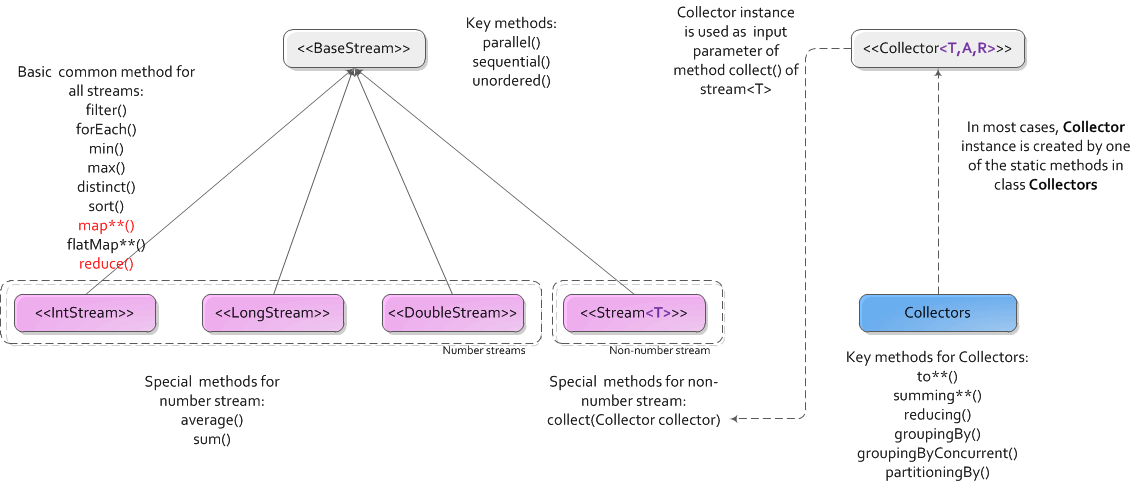
java_util_stream

The above only has most important components for understanding package java.util.stream.  4 builder interfaces corresponding to different stream type and 1 class for low-level library writers are not included.

There are only 1 class on above diagram, class Collectors, The rests are all interfaces. The most important are the 4 stream interfaces in pink. They can again be divided into 2 groups, streams for numbers and stream for other non-number object.  You can roughly think streams for number, IntStream/LongStream/DoubleStream, are special cases for Stream<T>, by set Generic Type T to Integer/Long/Double and add special methods for number manipulation like average(), sum().

All 4 streams has collect(supplier, accumulator, combiner) method. (supplier,accumlator,combiner will be described below). Method collect() provides the most general way to finally do the reduce. For number streams, in most cases, we don't need to use collect() at all, JDK provides shortcut methods, like average(),sum(),max(),min(), are good enough.

To simplify the usage of collect(supplier, accumulator, combiner) method, JDK extracts supplier, accumulator, combiner, together with finisher to the  interface Collector<T,A,R>. So reasonably there's an overload method collect(Collector<? super T,A,R> collector).

Furthemore, to make  collect(Collector<? super T,A,R> collector) easy to use, JDK provides the helper class Collectors with a bunch of static methods to create instance of Collector as input argument.

From the above diagram, we can see there's also reduce() methods for all stream, you can think them like simplified version of collect().

2. Stream methods

2.1 BaseStream functions

unordered(), make or just mark a stream is unordered. Usually it's used for parallel processing the stream. For example you have a stream from a list, which is ordered, but you only want to calculate the sum which has nothing to do with the order information, you can unordered the stream to make it can be processed in parallel.

sequential()/parallel(), change the stream to sequential or parallel.  Default stream is sequential for most cases, like the stream() return from a java collection.

2.2 Most used stream functions

For all example codes, suppose we have a variable users as list of User and  a stream userStream created from the list.

public class User {
  public static enum Gender {
    MALE, FEMALE
  }
 
  private Gender gender;
  private int age;
  private String username;
  
  // ignore getter,setter
}

List <User>  users;
// ignore initilization of users
Stream<User> userStream = users.stream();

filter(), screen out some element in the stream. For example

userStream.filtere(User u –> u.getAge() >= 18) //return stream with only adult users

will return a new stream with only adult users.

map(), can let you apply a given function on every element of the stream and create a new stream from that. For example

userStream().map(u->u.getAge());       //return Stream<Integer>
userStream().mapToInt(u->u.getAge());  //return IntStream

mapToInt() return a new IntStream which is convinient to process int elements.  There are also methods start with flatMap such as flatMap(),flatMapToInit(). The difference between map and flatMap is: map return only one output element for every one input element(Let's call it One-To-One), flatMap return multiple output for every single input(Let's call it One-To-Many).  for example:  

List&lg;string> lines = Arrays.asList("1 2 3 4", "5 6 7","8 9");
// every input string return multiple numbers
lines.stream().flatMap(line -> Arrays.asList(line.split("\\s+")).stream());

reduce(), will make a stream of type T finally return a single result of type T(let's call it Many-To-One). For example calcalate the sum of all users' age:

Optional<Integer> sum = userStream.map(u->u.getAge()).reduce((x,y)->x+y);
System.out.println("sum = "+sum.get());

When do reduce() on a Stream<Integer> return from map(), logically it will finally return a single Integer. In API level, a java.util.Optional<Integer> is used to contain that Integer.

Number streams has more methods special for number calculations, such as sum() or average(), so the previous example to calculate age sum can also be written like below:

int sum = stream.mapToInt(u->u.getAge()).sum();
System.out.println("sum = "+sum);

Also if we use the most generic method for reduction collect(), the previous age sum calculation can also be written like this:

int sum = userStream.collect(Collectors.summingInt(u -> u.getAge()));
System.out.println("sum = " + sum);

3. Collectors methods

The main purpose of class Collectors is to create Collector instance as input argument of stream's collect() method just like previous example. 

As name indicates, summing**() methods return Collector instance for producing the sum, averaging**() methods return Collector instance for producing arithmetic average. Here "**" can be Int, Long, and Double.

Methods like to**(), will return Collector that will return element in stream to a Java collection. Here "**" can be List, Set, Map,ConcurrentMap. The following example remove duplications from a list.

List<Integer> ages = Arrays.asList(25, 25, 30, 30, 35);  // list with duplication
List<Integer> distinctAges = ages.stream().distinct().collect(Collectors.toList()); // list without dup
System.out.println("distinctAges = " + Arrays.toString(distinctAges.toArray())); // [25,30,35]

Methods start like groupingBy() are very helpful.  They provide functions similar to "group by" in SQL.  There are several overload of groupingBy(), but mandatory parameter is the key to group, which will also be the key of the return Map.  For example, get a map of user grouped by gender, the key in the return Map is gender, the value is a user list of that gender.

// group users by gender
Map<Gender,List<User>> usersByGender = usreStream.collect(Collectors.groupingBy(u->u.getGender()));

If you want to calculate average user age for male and female respectively, see below.

Map<Gender, Double> averageAgeByGender = stream.collect(Collectors.groupingBy(User::getGender,
    Collectors.averagingDouble(User::getAge))); 
// print out  
averageAgeByGender.forEach((k,v)->System.out.printf("Average age of Gender %s is %f\n",k,v));

Methods partitioningBy(), can only group into 2 groups,  and key fixed to TRUE/FALSE,  so it can be thought as a simplified version of groupingBy(). 

4. Understand Collector

JDK provides class Collectors to make create Collector instance easily, so usually you don't play with Collector interface directly. But to better understand the stream process, you need at least know what a collector really does. 

Interface Collector<T,A,R> has 3 generic types:

  • T - the type of input elements to the reduction operation
  • A - the intermedia type of partial reduce result, most of time it's same as T, but as a application developer normally we don't care, so most of time "?" is used.
  • R - the result type of the reduction operation

The type T and R are more important for developers.

A collector has 4 main methods, they will be called internally in the collect() process. These 4 methods are:

  • creation of a new result container (A container = supplier().get())
  • incorporating a new data element into a result container (accumulator().accept(container, everyElement))
  • combining two result containers into one (combiner().apply(partialContainer1, partialContainer2))
  • performing an optional final transform on the container (finisher().apply(container))

The collector interface also provide a static method of(Supplier<A> supplier, BiConsumer<A,T> accumulator, BinaryOperator<A> combiner, Function<A,R> finisher, Collector.Characteristics... characteristics) to let you fully controll how to create a instance of your own collector.  Here's a example of creating Collector instance equivalent to Collectors.summingInt(), pay attention to how the supplier,accumulator,combiner and finisher are implemented.

// Can also defined as Collector<User,int[],Integer>
  Collector<User,?,Integer> myCollector; 
  
//myCollector = Collectors.summingInt(u->u.getAge());
  myCollector = Collector.of(
        () -> new int[1],                           //supplier
        (a, t) -> a[0] += t.getAge(),               //accumulator
        (a1, a2) -> {a1[0] += a2[0];return a1;},    //combiner
        a -> a[0]);                                 //finisher
    
  int sum = userStream.collect(myCollector);
  System.out.println("sum = " + sum);

5. Recap

To understand Java stream processing, we need to understand 4 stream interfaces(Stream<T>,IntStream,LongStream and DoubleStream), 1 Collecor interface and 1 Collectors class. Stream provide operations on every element in the stream, then reduce the element to final result. Besides many out-of-box functions for reduction, you can also use Collector and Collectors for more generic reduction operation.

Monday, January 18, 2016

Method Reference in Java 8

In java 8 method reference is introduced as a helper for the outstanding feature, Lambda Expression.  In some cases a lambda expression does nothing but to call an exsting method.  Method reference let you make this kind of lambda expression cleaner and shorter.

Let see an example, suppose we have a stream created from a User list. The class User has a int field call age with getter and setter.

List<User> users = Arrays.
//... add user in to list
Stream<User> stream = users.stream();

First without using method reference to calculate the averge age of all users.

Double averageAgeDouble = stream.collect(Collectors.averagingDouble((User u)->u.getAge()));

Using method reference, it looks like below

Double averageAgeDouble = stream.collect(Collectors.averagingDouble(User::getAge));

The method reference is shorter than normal lambda expression. The syntax is className::methodName,  which in our case is User::getAge, means arbitrary object of class User and the method name is getAge().

Thursday, January 7, 2016

Why DAO or Respository bean can be singleton in Spring

This question based on one fact: instance of javax.persistence.EntityManager is NOT thread-safe. Then how does spring handle concurrency on singleton DAO object.

Suppose we have a simple DAO bean  looks like below, used in a concurrent scenario, such as in a web application.

import javax.persistence.EntityManager;
import javax.persistence.PersistenceContext;
import javax.transaction.Transactional;

import com.shengwang.demo.model.User;  // a trivial entity

@Transactional
public class UserDao {
  @PersistenceContext
  private EntityManager em;
  
  public void addUser (User user) {
    em.persist(user);
  }
}

Can you set the scope of this bean to singleton in JEE context?  (NO)

Can you set the scope of this bean to singleton in Spring context? (YES, but why? see below)

1. In JEE

Usually DAO bean is stateless. Our DAO bean above is just a stateless bean, so in JEE most common way is to mark it as @Stateless and create a instance pool of this DAO. JEE container will maintain this pool,  assign a  bean instance handle for every individual invocation, and bean will release back to the pool after invocation.

Because the EntityManager is non thread-safe, the solution for concurrency in JEE is creating a pool.  That sounds reasonable.

2. In Spring

The default scope of bean in spring is singleton, and offical document recommend you to set DAO bean singleton, which means just use the default scope config is fine.

But Why? When multiple threads access this single object, why the non thread-safe EntityManager instance does not complain? The reason is  that in Spring framework, the Entitymanager instance em in the Dao bean is not a real EntityManager, but a proxy.  Which mean very invocation on em, like em.persist(), is handled by a  proxy.

In case you are not familiar with Proxy in Java reflection, here are  some basic knowledge for quick understanding.

2.1 basic about proxy

In java reflection package java.lang.reflect , there is a Proxy class.  Java provide a mechenism to create a proxy for any class.  Suppose we want to create a proxy for class Foo. Code looks like :

Foo f = (Foo) Proxy.newProxyInstance(Foo.class.getClassLoader(), new Class[] { Foo.class }, handler);

The instance f is a proxy. The last parameter handler is an implementation of interface java.lang.reflect.InvocationHandler. When any methods of instance f get called, the handler’s only method , invoke(Object proxy, Method method, Object[] args), get called. So in this method,  you have a chance to place some logic before/after the real invocation.

2.2 Spring use proxy to get real EntityManager on every invocation.

Since the em injected to DAO is just a proxy, every call on the em will first try to get the real EntityManager object in the handler.  This logic is located in org.springframework.org.jpa.SharedEntityManagerCreator. This class implements the InvocationHandler interface and has a invoke() method. In this method, there are codes like:

EntityManager target = EntityManagerFactoryUtils.doGetTransactionalEntityManager(...);

This doGetTransactionalEntityManager(…) will get EntityManager bound to current thread! If we follow the doGetTransactionalEntityManager(…) method, we will find following in method.

EntityManagerHolder emHolder = (EntityManagerHolder) TransactionSynchronizationManager.getResource(emf);

Keep tracking getResource(…), you will found the resource is a ThreadLocal map variable defined in class org.springframework.transaction.support.TransactionSynchronizationManager

Now you should understand why the Dao can (should) be a singleton bean in spring framework. Because spring internally use Proxy and ThreadLocal to eliminate the impact the non thread-safe EntityManager bring to stateless bean.  No need to create pool for concurrency anymore!

All code snippets above are based on Spring framework 4.1.0.RELEASE.

3. Recap

To some extends, you can think spring framework use a ThreadLocal variable as the stateless bean pool in JEE. You can also think this somehow way of a Flyweight design pattern, use a shared object to save overhead of create/destroy objects.

Wednesday, December 30, 2015

Understand spring security easily – concept view

Spring security is designed to provide both authentication and authorization to Java applications.

This article mainly try to describe spring security from a general concept view, give you a whole picture of how the spring security works in most usage. Other articles are:

Understand spring security easily – developer view (to be continued)  

Understand spring security easily – annotation example (to be continued)  

0. Basic senario

In this serial we only focus on the most popular senario, web application security and using username+password to get access. Passwords are stored in database. This article is based on spring security  4.x

1. key concept

Credential – namely password in our username + password senario.

Princple – you can think it’s a kind of identification of a user.  It includes username, password and all the authorities that this user has. Most authentication mechanisms withing spring security return an instance of UserDetails as the principal.

UserDetails – just an interface in package org.springframework.security.core.userdetails. Like said above, an instance of UserDetails always used as identification of a user. What does this mean? It means when you read you database get all information for a user, you finally get a instance of UserDetails.

3 most used methods of UserDetails are getUserName(),getPassword and getAuthorities().

Spring security provide a implementation, org.springframework.security.core.userdetails.User. But in practicle, in a spring project with ORM, you normally will have your own implementation of UserDetails. It’s often looks like:

public class CustomUser extends YourUserEntity implements UserDetails {
 //...
}

Spring security will use UserDetails instance created according to database to test browser provided info. Now the question is, “create UserDetails instance”, where does this happen?  In UserDetailsService.

UserDetailsService – This interface only has one method,UserDetails loadUserByUsername(String username)In real project you also need to provide an implementation of this interface and it often looks like:

public class CustomUserDetailsService implements UserDetailsService {
  @Override
  UserDetails loadUserByUsername(String username) {
    // access database by DAO or Spring data repository
    CustomUser userInDatabase = (CustomUser)yourUserEntityRepository.findByUsername(username);
    return userInDatabase;
  }
}

This is the place you put your own code to access database to load user information.(We define CustomUser as a child of YourUserEntity, remember?)

1. Filter Chain

The spring security is mainly build on servlet filters. Filter has a doFilter(…,FilterChain chain) . In method doFilter , there’s always a call to chain.doFilter(), which devides the filter into 2 pieces. Code before chain.doFilter() run before the request reach any servlet, code after chain.doFilter() run after the request being processed and before response send back to browser.

There are many filters in spring security and the order of these filters matters. Here is a filter list from spring security reference. There are 10+ filters in spring security, but check several key filters:

  • UsernamePasswordAuthenticationFilter – This filter get your http post username + password and create and verify the password.
  • ExceptionTranslationFilter – If not authenticated, jump to login page.
  • FilterSecurityInterceptor – if the logined user has right to access the target url. (Authorization)
  • These 3 filters are key to understand the work flow of spring security authentication and authorization.

Tuesday, December 29, 2015

"Config method" in Spring framework

1. Concept

What is config method in Spring? Any method that is anotated by @autowired is config method.

What’s the difference between a normal method and a config method in spring? Config method will be automatically  invoked when the bean instance created, after constructor but before @PostConstruct. The parameters of config method will be autowired from the application context. 

The name of the method doen’t matter and parameter number doesn’t matter. In fact we often use @autowired before setter method, that’s  just a special case of spring config method.

2. Usage of config method

Genetic config method is not widely use as field injection, setter injection or constructor injection,  but config method is used  in spring security.  According to spring security official reference here, the first step to config spring security is to extend from WebSecurityConfigurerAdapter like below.

import org.springframework.beans.factory.annotation.Autowired;

import org.springframework.context.annotation.*;
import org.springframework.security.config.annotation.authentication.builders.*;
import org.springframework.security.config.annotation.web.configuration.*;

@EnableWebSecurity
public class SecurityConfig extends WebSecurityConfigurerAdapter {

  @Autowired
  public void configureGlobal(AuthenticationManagerBuilder auth) throws Exception {
    auth.inMemoryAuthentication().withUser("user").password("password").roles("USER");
  }
}

This is a good example of using config method.  config method will be automatically invoked when bean instantiated, that’s why the document said

The name of the configureGlobal method is not important.

Because it just a config method, and will be automatically invoked with a AuthenticatonManagerBuilder bean from context. The purpose of this method is just to using AuthenticationManagerBuilder to setup authentication provider before real logic begins.

3. See also

spring framework javadoc of @Autowired

Wednesday, December 23, 2015

Break down package java.util.concurrent.locks

Since JDK 5, Java introduced the most powerful enhancement for concurrence, the package java.util.concurrent.This package contain 2 subpackages, one of them is java.util.concurrent.locks, which provides the notion of locks for synchorization. (BTW, the other subpackage is java.util.concurrent.atomic, which is a small toolkit of classes that support lock-free thread-safe programming on single variables, making common operation like i++ atomic in concurrent environment)

This article will give a big picture of the package java.util.concurrent.locks. Help you get a better understanding of this package.

This article suppose you have already know basic usage of the locks, so will not try to go into usage details, but to focus on the realations of all interfaces and classes as a whole.

1. Hirerarchy diagram

java_locks

There are only 3 interfaces in this package(green boxes). The diagram also has 4 concreate classes. Only the 2 classes in pink are usually created by keyword new directly, the rest two can not create by a direct new, because their constructor are not public but protected.

2. More explanation

The Condition instance is used to replace the low-level synchronization monitor. (If you want to know more about Java build-in low level synchronization mechanism, see here)

There is no public implementation of this interface in JDK. The only way to create Condition instance is  by newCondition() method of a Lock objects.

The methods await() and signal() are designed to replace the built-in wait() and notify() of every java Object.

The interfaces Lock and ReadWriteLock has no parent-child relation! Although Lock may sound like the parent of ReadWriteLock, but in fact they have no relations at all.

Since all locks implementation are reentrant, which means a thread already has lock can successfully call lock() again without blocking. So there are ways to get how lock hold count in program to know how many times to call unlock(). See the methods getHoldCount() and getReadHoldCount()/getWriteHoldCount().

ReentrantReadWriteLock.ReadLock  and ReentrantReadWriteLock.WriteLock (2 white boxes in diagram),can not be initialized by keyword new since they don’t have public constructors. So the instaces of these two classes can not live independently, but always accompanied by a ReentrantReadWriteLock instance.

Hope now you have a more clear view of package java.util.concurrent.locks.

Powered by Blogger.

About The Author

My Photo
Has been a senior software developer, project manager for 10+ years. Dedicate himself to Alcatel-Lucent and China Telecom for delivering software solutions.

Pages

Unordered List