Showing posts with label JEE. Show all posts

Thursday, January 7, 2016

Why DAO or Respository bean can be singleton in Spring

This question based on one fact: instance of javax.persistence.EntityManager is NOT thread-safe. Then how does spring handle concurrency on singleton DAO object.

Suppose we have a simple DAO bean  looks like below, used in a concurrent scenario, such as in a web application.

import javax.persistence.EntityManager;
import javax.persistence.PersistenceContext;
import javax.transaction.Transactional;

import com.shengwang.demo.model.User;  // a trivial entity

@Transactional
public class UserDao {
  @PersistenceContext
  private EntityManager em;
  
  public void addUser (User user) {
    em.persist(user);
  }
}

Can you set the scope of this bean to singleton in JEE context?  (NO)

Can you set the scope of this bean to singleton in Spring context? (YES, but why? see below)

1. In JEE

Usually DAO bean is stateless. Our DAO bean above is just a stateless bean, so in JEE most common way is to mark it as @Stateless and create a instance pool of this DAO. JEE container will maintain this pool,  assign a  bean instance handle for every individual invocation, and bean will release back to the pool after invocation.

Because the EntityManager is non thread-safe, the solution for concurrency in JEE is creating a pool.  That sounds reasonable.

2. In Spring

The default scope of bean in spring is singleton, and offical document recommend you to set DAO bean singleton, which means just use the default scope config is fine.

But Why? When multiple threads access this single object, why the non thread-safe EntityManager instance does not complain? The reason is  that in Spring framework, the Entitymanager instance em in the Dao bean is not a real EntityManager, but a proxy.  Which mean very invocation on em, like em.persist(), is handled by a  proxy.

In case you are not familiar with Proxy in Java reflection, here are  some basic knowledge for quick understanding.

2.1 basic about proxy

In java reflection package java.lang.reflect , there is a Proxy class.  Java provide a mechenism to create a proxy for any class.  Suppose we want to create a proxy for class Foo. Code looks like :

Foo f = (Foo) Proxy.newProxyInstance(Foo.class.getClassLoader(), new Class[] { Foo.class }, handler);

The instance f is a proxy. The last parameter handler is an implementation of interface java.lang.reflect.InvocationHandler. When any methods of instance f get called, the handler’s only method , invoke(Object proxy, Method method, Object[] args), get called. So in this method,  you have a chance to place some logic before/after the real invocation.

2.2 Spring use proxy to get real EntityManager on every invocation.

Since the em injected to DAO is just a proxy, every call on the em will first try to get the real EntityManager object in the handler.  This logic is located in org.springframework.org.jpa.SharedEntityManagerCreator. This class implements the InvocationHandler interface and has a invoke() method. In this method, there are codes like:

EntityManager target = EntityManagerFactoryUtils.doGetTransactionalEntityManager(...);

This doGetTransactionalEntityManager(…) will get EntityManager bound to current thread! If we follow the doGetTransactionalEntityManager(…) method, we will find following in method.

EntityManagerHolder emHolder = (EntityManagerHolder) TransactionSynchronizationManager.getResource(emf);

Keep tracking getResource(…), you will found the resource is a ThreadLocal map variable defined in class org.springframework.transaction.support.TransactionSynchronizationManager

Now you should understand why the Dao can (should) be a singleton bean in spring framework. Because spring internally use Proxy and ThreadLocal to eliminate the impact the non thread-safe EntityManager bring to stateless bean.  No need to create pool for concurrency anymore!

All code snippets above are based on Spring framework 4.1.0.RELEASE.

3. Recap

To some extends, you can think spring framework use a ThreadLocal variable as the stateless bean pool in JEE. You can also think this somehow way of a Flyweight design pattern, use a shared object to save overhead of create/destroy objects.

Monday, November 30, 2015

Understand Persistence Context Collision in JEE

When deal with persistence layer in JEE application, persistence context is the magic that make your entity instances different from a normal POJO. Persistence context manages the entity instances to make it finally synchronized with database.

The persistence context collision happens when invoking stateful session bean from a stateless session method if both beans has their EntityManager defined. (BTW, Use stateful bean from stateless bean itself is not a good idea, but this article just focuses on persistence context)

In this article, for simplicity, when we mention stateless bean, we mean a stateless bean with EntityManager variable and its methods operate on the persistence. When  we mention stateful bean, we mean a stateful bean with EntityManager variable and its methods operate on persistence. In short we only talk about beans in persistence layer.

0. Basic rules about persistence context

Here are some basic rules about persistence context:

There will be only one active persistence context at any time for a transaction.

JEE container can propagate persistence context between different EntityManager variables in a single transaction. (Different EntityManager field variables of different beans can use the same persistence context).

Stateless bean usually use transaction-scoped persistence context, which means when the transaction is over, the persistence context is also gone. (When the bean's method is over, transaction is gone, persistence context is also gone)

Stateful bean usually use extended persistence context. The persistence is created when the bean instance is created and only destroy when the stateful bean is removed. The extended persistence context will be associated to a transaction when a method of stateful bean is called. When the method is over, transaction is gone, but the persistence context doesn't  go with the transaction but stay for the next transaction until the whole stateful bean is removed by the container.

Stateful bean always use his own extended  persistence context,  if the active persistence context is not the extended one, javax.ejb.EJBException will be thrown, this is called persistence context collision. This usually happens when call a stateful bean from a stateless bean.

Let see a simple example of persistence context collision.

1. Define pom.xml

<project xmlns="http://maven.apache.org/POM/4.0.0" xmlns:xsi="http://www.w3.org/2001/XMLSchema-instance"
xsi:schemaLocation="http://maven.apache.org/POM/4.0.0 http://maven.apache.org/maven-v4_0_0.xsd">
<modelVersion>4.0.0</modelVersion>
<groupId>com.shengwang.demo</groupId>
<artifactId>jee-persistence-context-collision</artifactId>
<packaging>war</packaging>
<version>1.0</version>
<name>jee-persistence-context-collision Maven Webapp</name>
<url>http://maven.apache.org</url>

<properties>
<project.build.sourceEncoding>UTF-8</project.build.sourceEncoding>
<!-- where glassfish 4.0 is installed -->
<glassfish.home>D:\glassfish4.0</glassfish.home>
</properties>

<dependencies>
<dependency>
<groupId>javax</groupId>
<artifactId>javaee-api</artifactId>
<version>7.0</version>
</dependency>
</dependencies>
<build>
<finalName>jee-persistence-context-collision</finalName>
<plugins>
<!-- Use Java 1.7 -->
<plugin>
<groupId>org.apache.maven.plugins</groupId>
<artifactId>maven-compiler-plugin</artifactId>
<version>2.5.1</version>
<configuration>
<source>1.7</source>
<target>1.7</target>
</configuration>
</plugin>

<!-- use mvn cargo:run to deploy and start server-->
<plugin>
<groupId>org.codehaus.cargo</groupId>
<artifactId>cargo-maven2-plugin</artifactId>
<inherited>true</inherited>
<configuration>
<container>
<containerId>glassfish4x</containerId>
<type>installed</type>
<home>${glassfish.home}</home>
</container>
<configuration>
<type>existing</type>
<home>${glassfish.home}/glassfish/domains</home>
</configuration>
</configuration>
</plugin>
</plugins>
</build>
</project>

The pom has 1 dependency for JEE 7 and 2 plugins. The first plugin specify the Java version (Java 1.7), the second one is for deploying package to local glassfish 4.0 with maven command-line. Demo use glassfish 4.0 as JEE container.


2. Define entity class


A very simple entity class Client.java with 2 fields, int clientId and String name.

package com.shengwang.demo.entity;

import javax.persistence.Column;
import javax.persistence.Entity;
import javax.persistence.GeneratedValue;
import javax.persistence.GenerationType;
import javax.persistence.Id;

@Entity
public class Client {
@Id
@GeneratedValue(strategy = GenerationType.IDENTITY)
@Column(name = "CLIENT_ID")
private int clientId;

private String name;

/* getter setter omitted */

@Override
public String toString() {
return "{" + clientId + "," + name + "}";
}
}

The entity is trivial.


3. Define stateful bean

package com.shengwang.demo.session;

import javax.ejb.Stateful;
import javax.persistence.EntityManager;
import javax.persistence.PersistenceContext;
import javax.persistence.PersistenceContextType;

import com.shengwang.demo.entity.Client;

@Stateful
public class MyStatefulBean {
@PersistenceContext (type=PersistenceContextType.EXTENDED) // extended
EntityManager em;
Client client;

public String changeClientName() {
if (client == null) {
client = em.find(Client.class, 1);
}
client.setName(client.getName() + "_" + "hello");

return client.toString();
}
}

This stateful bean just for demo, so doesn't make much sense. Its only method change the first client's name, add suffix to the name.


4. Define stateless bean

package com.shengwang.demo.session;

import javax.ejb.EJB;
import javax.ejb.Stateless;
import javax.persistence.EntityManager;
import javax.persistence.PersistenceContext;

import com.shengwang.demo.entity.Client;

@Stateless
public class MyStatelessBean {
@PersistenceContext
EntityManager em;

@EJB
MyStatefulBean statefulBean;

public String methodA() {
String c1 = em.find(Client.class, 1).toString(); // any operation of em
String c2 = statefulBean.changeClientName();

return c1 + "," + c2;
}
}

The stateless bean has one method, methodA. Call the em.find() first then call the stateful beans's method. Calling methodA() will cause persistence context collision!


Why? Because the transaction-scoped persistence is created lazy,  so it(PC-A) will be created only when em.find()  called, and this persistence context is now the active persistence context. But the stateful bean with extended persistence context init persistence context eagerly, which means the stateful bean already has a persistence context(PC-B) when it initialized. Now the active persistence context propagated to stateful bean,PC-A,   is not the extended persistence context PC-B. So collision happens and exception will be thrown. We can see this when we try to run it below.


5. Define a servlet as EJB client


To use the beans we defined above, let's define a simple servlet.

package com.shengwang.demo.servlet;

import java.io.IOException;
import java.io.PrintWriter;

import javax.ejb.EJB;
import javax.servlet.ServletException;
import javax.servlet.annotation.WebServlet;
import javax.servlet.http.HttpServlet;
import javax.servlet.http.HttpServletRequest;
import javax.servlet.http.HttpServletResponse;

import com.shengwang.demo.session.MyStatefulBean;
import com.shengwang.demo.session.MyStatelessBean;


@WebServlet(name = "testServlet", urlPatterns = { "/test" })
public class TestServlet extends HttpServlet {
private static final long serialVersionUID = 1L;

@EJB
MyStatelessBean statelessBean;

@EJB
MyStatefulBean statefulBean;

@Override
protected void doGet(HttpServletRequest req, HttpServletResponse resp) throws ServletException, IOException {
String str = statelessBean.methodA();

PrintWriter out = resp.getWriter();
out.printf("%s", str);
out.flush();
}
}

In the servlet, the stateless bean's only method is invoked.


6. Config persistence.xml


Usually the META-INFO/persistence.xml is simple for JEE applications, tell the server which data source application wants to use.

<?xml version="1.0" encoding="UTF-8"?>
<persistence version="2.1" xmlns="http://xmlns.jcp.org/xml/ns/persistence"
xmlns:xsi="http://www.w3.org/2001/XMLSchema-instance"
xsi:schemaLocation="http://xmlns.jcp.org/xml/ns/persistence
http://xmlns.jcp.org/xml/ns/persistence/persistence_2_1.xsd">
<persistence-unit name="demo-persistence-unit" transaction-type="JTA">
<jta-data-source>jdbc/MySQLDataSource</jta-data-source>
</persistence-unit>
</persistence>

There's a data source on server with JNDI name  jdbc/MySqlDataSource.


image


Finally, before running the demo, the project hierarchy looks like below.
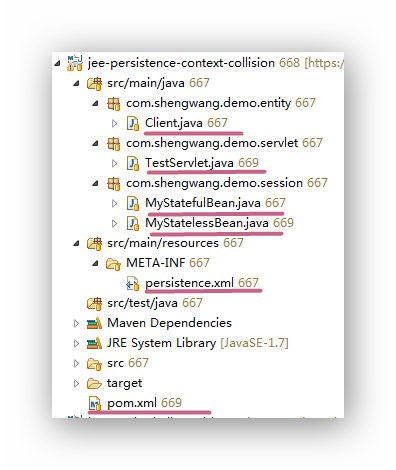
image 

7. Run the demo


Run the demo with mvn command-line:

mvn clean verify cargo:run

This command will start glassfish server and deploy our application to it. Then access the servlet by browser. You can see the exception: javax.ejb.EJBException: There is an active transactional persistence context for the same EntityManagerFactory as the current stateful session bean's extended persistence context
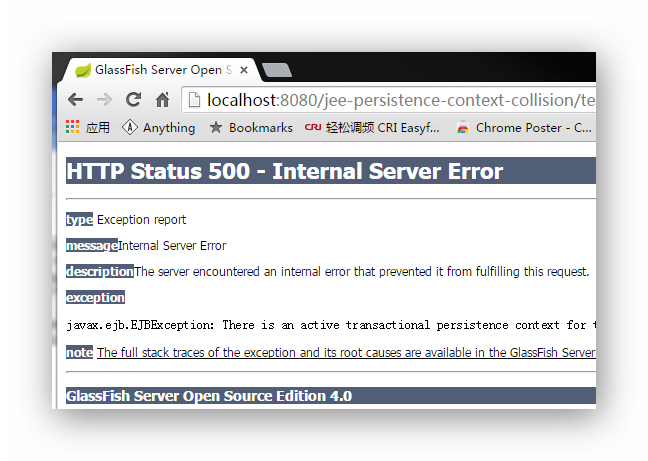

image


8. What's more


What will happen if we make a little change to the stateless bean.

@Stateless
public class MyStatelessBean {
@PersistenceContext
EntityManager em;

@EJB
MyStatefulBean statefulBean;

public String methodA() {

// These 2 lines switch order
String c2 = statefulBean.changeClientName();
String c1 = em.find(Client.class, 1).toString();

return c1 + "," + c2;
}
}

The order of two lines are swithed. Now the demo can run without any exception.

Why? Because when invoke the stateful bean there is no persistence context yet, so the stateful bean's method can use its own extended persistence context to run. Then the em.find() is invoked, a transaction-scoped persistence create when first em operation invoked. So these 2 lines use different persistence context! If this is understood, then then output also makes sense to you.
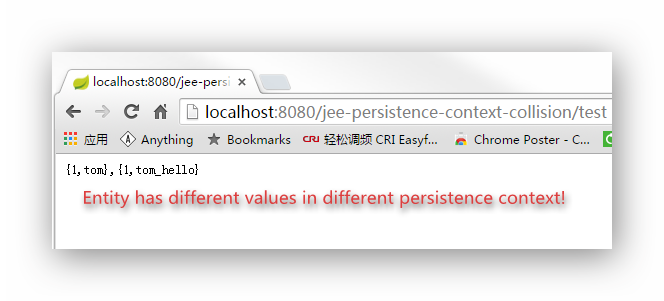
image


Furthermore, If you really need to call stateful bean from stateless bean in it original order, which cause the persistence context collision. Here are some detours ( think twice when you want to do this):


1. Mark stateful bean (or its method invoked by stateless bean) REQUIRE_NEW for TransactionAttributeType. So there will be 2 transactions for stateless and stateful bean respectively. Each transaction can has its own persistence context. Similar scenario like above, entities may have different values on different context.


2. Mark stateful bean (or its method invoked by stateless bean) NOT_SUPPORT for TransactionAttributeType. If only invoke stateful bean's read-only operation from stateless bean.  (Servers like Glassfish may need to config JDBC connection pool to enable Non Transactional Connections)


3. Use Application-Managed EntityManager instead of the default Container-Managed Entity Manager in the stateful bean.

Monday, November 23, 2015

How to setup a maven JEE project in Eclipse

Let's suppose you are new to JEE programming. After reading oracle official JEE tutorial document for a few days, you decide to get your hands wet.  You  download and install a JEE container, GlassFish 4 in this tutorial,  to your PC. You have JDK,maven and Eclipse all ready. So, what's next?

This demo shows you how to create maven project in Eclipse that can automatically deploy to a local GlassFish server. 

0. What you need

  • JDK 7+
  • Glassfish 4.0
  • Maven
  • Eclipse Java EE IDE (Luna 4.4.2 used in this demo)

1. Create a Empty Maven project in Eclipse

image

image

Since the demo is about servlet, so choose webapp archetype. For EJB you can choose the most simple one "maven-archetype-quickstart". The click  next until finish.

2. Modify pom.xml

Modify pom file for 4 reasons.

  • Change default package from "jar" to "war"
  • Add JEE dependency
  • Change default Java version to 1.7 
  • Configure Cargo plugin so we can use maven command-line to deploy you JEE package to server
<project xmlns="http://maven.apache.org/POM/4.0.0" xmlns:xsi="http://www.w3.org/2001/XMLSchema-instance"
xsi:schemaLocation="http://maven.apache.org/POM/4.0.0 http://maven.apache.org/maven-v4_0_0.xsd">
<modelVersion>4.0.0</modelVersion>
<groupId>com.shengwang.demo</groupId>
<artifactId>jee-servlet-demo</artifactId>
<packaging>war</packaging>
<version>1.0</version>
<name>jee-servlet-demo Maven Webapp</name>
<url>http://maven.apache.org</url>

<properties>
<project.build.sourceEncoding>UTF-8</project.build.sourceEncoding>
<!-- This is where I have my glassfish installed -->
<glassfish.home>D:\glassfish4.0</glassfish.home>
</properties>

<dependencies>
<!-- JEE dependency -->
<dependency>
<groupId>javax</groupId>
<artifactId>javaee-api</artifactId>
<version>7.0</version>
</dependency>
</dependencies>

<build>
<finalName>jee-servlet-demo</finalName>

<!-- Use Java 1.7 -->
<plugins>
<plugin>
<groupId>org.apache.maven.plugins</groupId>
<artifactId>maven-compiler-plugin</artifactId>
<version>2.5.1</version>
<configuration>
<source>1.7</source>
<target>1.7</target>
</configuration>
</plugin>

<!-- config cargo use local installed Glassfish -->
<plugin>
<groupId>org.codehaus.cargo</groupId>
<artifactId>cargo-maven2-plugin</artifactId>
<inherited>true</inherited>
<configuration>
<container>
<containerId>glassfish4x</containerId>
<type>installed</type>
<home>${glassfish.home}</home>
</container>
<configuration>
<type>existing</type>
<home>${glassfish.home}/glassfish/domains</home>
</configuration>
</configuration>
</plugin>

</plugins>
</build>
</project>

3. Change Servlet version


The just created project may have error about servlet version, since the archetype in Eclipse is not actively maintained. The project is still using servlet version 2.3.  There's also a bug in Eclipse that you can't change the version, You can only disable the Dynamic Web Module facets and set it again.


Right click on project name, and choose "Project Facets", then unselect Dynamic Web Module first.


image


Uncheck the Dynamic Web Module, click OK to finish.  Then open project facets again, set it back.


image


4. Set JEE application related config 


In this demo, servlet need a web.xml for deploy. If writing a EJB has persistence, then you may need a JPA config file persistence.xml.

<web-app xmlns="http://java.sun.com/xml/ns/javaee"
xmlns:xsi="http://www.w3.org/2001/XMLSchema-instance"
xsi:schemaLocation="http://java.sun.com/xml/ns/javaee
http://java.sun.com/xml/ns/javaee/web-app_3_0.xsd"
version="3.0">

<display-name>Demo for jee servlet hello world config</display-name>

</web-app>

The web.xml for this JEE servlet is almost empty. There is no <servlet> and <servlet-mapping> for normal servlet container (like tomcat) deployment. Because JEE server can automatic register servlets with annotation @WebServlet


5. Define Java class


We has only one class to write, HelloServlet.java. If the src/main/java directory not exists, create it by hand.

package com.shengwang.demo;

import java.io.IOException;
import java.io.PrintWriter;
import javax.servlet.ServletException;
import javax.servlet.annotation.WebServlet;
import javax.servlet.http.HttpServlet;
import javax.servlet.http.HttpServletRequest;
import javax.servlet.http.HttpServletResponse;


@WebServlet(name = "helloServlet", urlPatterns = { "/hello" })
public class HelloServlet extends HttpServlet {
private static final long serialVersionUID = 1L;

@Override
protected void doGet(HttpServletRequest req, HttpServletResponse resp) throws ServletException, IOException {
PrintWriter out = resp.getWriter();
out.printf("%s", "hello world from a JEE servlet");
out.flush();
}
}

This class use JEE annotation @WebServlet to provide http service at url localhost:8080/context_name/urlPattern . context_name is set in pom.xml by <finalName>, urlPattern is the urlPattern set in Java code. So for this demo the url is http://localhost:8080/jee-servlet-demo/hello


All done, now this 3-files project hierarchy looks like:


image


6. Run


Use maven command line to auto deploy our servlet to the local GlassFish server.

mvn clean verify cargo:run

The console output looks like below, the cargo maven plugin will start server and deploy automatically.


image


Now access our hello world level JEE servlet by browser.


image


Now if you open admin console of GlassFish, you can see our demo is correctly deployed. (Login required, default user is 'admin', default password is 'adminadmin' for cargo plugin)


image

Thursday, November 12, 2015

Understand Glassfish JDBC configuration by inspecting JDBC DataSource API

When configure DataSource on JEE container Glassfish, There are 2 things need to be set, JDBC Resource and JDBC Connection Pools.

image

What's the difference and why are these two items? What's the relation between them? We can answer that by inspecting the Java JDBC API, mainly in package javax.sql

1. How to connect to DB

To work with DB in Java, the application must have a connections  (java.sql.Connection) to the database.  There are 2 ways to get a connection in JDBC:

  • Method 1, using static method, DriverManager.getConnection(url). This is a very old way, still valid, only used in small standalone applications, doesn't support pooling.
  • Method2, using DataSource interface. Recommended. In most case work with JNDI lookup to get one from a container.

2. The hierarchy of DataSource


jdbc

There are some points need to be noticed about this diagram:

They are all interfaces. No concrete class at all.

There are 3 interfaces related to data source, DataSource/ConnectionPoolDataSource/XADataSource.

Application Java code will ONLY come into contact with the green part. DataSource and Connection.

ConnectionPoolDataSource instance can create PooledConnection instance(pooled...you know,name tells all), XADataSrouce can create XAConnection (for distributed transaction)

The ConnectionPoolDataSource, although may sounds like, but is not a Child of DataSource. In other words, A  ConnectionPoolDataSource instance can't be simply casted to DataSource instance. So inside a DataSource instance, the real work will somehow be delegate to a ConnectionPoolDataSource/XADataSouce.

Same thing applied to Connection. The Connection has nothing to do with PooledConnection, although they looks similar. No casting but delegation.

Up to know you should understand the relationship between JDBC Resource and JDBC Connection Pools in Glassfish Administration GUI. Think JDBC Resource as DataSource and JDBC Connection Pools  as ConnectionPoolDataSource.

3. Using MySQL in Glassfish

Let's use MySQL's official developer guide on "Using Connector/J with GlashFish" as a testify. On this document, the configuration has 2 steps:

  • step1. Creating a Connection Pool, filling in  information like DB's IP address, username and password for make "real" connections to database.
  • step2. Create a JDBC Resource. choose a pool created in step 1 and set a JNDI name for it.  We can say the JDBC Resource HAS-A pool.

The steps can pretty much demonstrate the hierarchy of DataSource in JDBC API, which once get understood will make the configuration steps make sense and easy to remember.

Tuesday, September 1, 2015

HTML Tags for JavaServer Faces (JSF)

The HTML Tags in for JSF is mostly used tags when writing JSF page. They are listed here for quick reference. The table comes from oracle JEE7 documents here.

Tag

Functions

Rendered As

Appearance

h:column

Represents a column of data in a data component

A column of data in an HTML table

A column in a table

h:commandButton

Submits a form to the application

An HTML <input type=value> element for which the type value can be"submit", "reset", or "image"

A button

h:commandLink

Links to another page or location on a page

An HTML <a href> element

A link

h:dataTable

Represents a data wrapper

An HTML <table> element

A table that can be updated dynamically

h:form

Represents an input form (inner tags of the form receive the data that will be submitted with the form)

An HTML <form> element

No appearance

h:graphicImage

Displays an image

An HTML <img> element

An image

h:inputFile

Allows a user to upload a file

An HTML <input type="file"> element

A field with a Browse... button

h:inputHidden

Allows a page author to include a hidden variable in a page

An HTML <input type="hidden">element

No appearance

h:inputSecret

Allows a user to input a string without the actual string appearing in the field

An HTML <input type="password">element

A field that displays a row of characters instead of the actual string entered

h:inputText

Allows a user to input a string

An HTML <input type="text"> element

A field

h:inputTextarea

Allows a user to enter a multiline string

An HTML <textarea> element

A multirow field

h:message

Displays a localized message

An HTML <span> tag if styles are used

A text string

h:messages

Displays localized messages

A set of HTML <span> tags if styles are used

A text string

h:outputFormat

Displays a formatted message

Plain text

Plain text

h:outputLabel

Displays a nested component as a label for a specified input field

An HTML <label> element

Plain text

h:outputLink

Links to another page or location on a page without generating an action event

An HTML <a> element

A link

h:outputText

Displays a line of text

Plain text

Plain text

h:panelGrid

Displays a table

An HTML <table> element with <tr>and <td> elements

A table

h:panelGroup

Groups a set of components under one parent

A HTML <div> or <span> element

A row in a table

h:selectBooleanCheckbox

Allows a user to change the value of a Boolean choice

An HTML <input type="checkbox">element

A check box

h:selectManyCheckbox

Displays a set of check boxes from which the user can select multiple values

A set of HTML <input> elements of type checkbox

A group of check boxes

h:selectManyListbox

Allows a user to select multiple items from a set of items all displayed at once

An HTML <select> element

A box

h:selectManyMenu

Allows a user to select multiple items from a set of items

An HTML <select> element

A menu

h:selectOneListbox

Allows a user to select one item from a set of items all displayed at once

An HTML <select> element

A box

h:selectOneMenu

Allows a user to select one item from a set of items

An HTML <select> element

A menu

h:selectOneRadio

Allows a user to select one item from a set of items

An HTML <input type="radio">element

A group of options

Wednesday, August 19, 2015

Maven Dependencies for JEE 7

A brief maven dependencies list for JEE7 related applications. The table below originally published by glassfish wiki

Component maven
Java EE 7 Full Platform JSR 342

<dependency>
   <groupId>javax</groupId> 
    <artifactId>javaee-api</artifactId> 
    <version>7.0</version>
</dependency>

Java EE 7 Web Profie

<dependency>
   <groupId>javax</groupId>  
    <artifactId>javaee-web-api</artifactId>  
    <version>7.0</version>
</dependency>

Concurrency Utilities for Java EE (JSR 236)

<dependency>
    <groupId>javax.enterprise.concurrent</groupId>
    <artifactId>javax.enterprise.concurrent-api</artifactId>
    <version>1.0</version>      
</dependency>

Java Persistence API 2.1 (JSR 338)

<dependency>
  <groupId>org.eclipse.persistence</groupId>
    <artifactId>javax.persistence</artifactId>
    <version>2.1.0</version></dependency>

Java API for RESTful Web Services 2.0 (JSR 339)

<dependency>
    <groupId>javax.ws.rs</groupId>
    <artifactId>javax.ws.rs-api</artifactId>
    <version>2.0</version>
</dependency>

Servlets 3.1 (JSR 340)

<dependency>
    <groupId>javax.servlet</groupId>
    <artifactId>javax.servlet-api</artifactId>
    <version>3.1.0</version>
</dependency>

Expression Language 3.0 (JSR 341)

<dependency>
    <groupId>javax.el</groupId>
    <artifactId>javax.el-api</artifactId>
    <version>3.0.0</version>
<dependency>

Java Message Service 2.0 (JSR 343)

<dependency>
    <groupId>javax.jms</groupId>
    <artifactId>javax.jms-api</artifactId>
    <version>2.0</version>
</dependency>

JavaServer Faces 2.2 (JSR 344)

<dependency>
    <groupId>javax.faces</groupId>
    <artifactId>javax.faces-api</artifactId>
    <version>2.2</version>
</dependency>

Enterprise JavaBeans 3.2 (JSR 345)

<dependency>
    <groupId>javax.ejb</groupId>
    <artifactId>javax.ejb-api</artifactId>
    <version>3.2</version>
</dependency>

Context & Dependency Injection 1.1 (JSR 346)

<dependency>
    <groupId>javax.enterprise</groupId>
    <artifactId>cdi-api</artifactId>
    <version>1.1</version>
</dependency>

Bean Validation 1.1 (JSR 349)

<dependency>
    <groupId>javax.validation</groupId>
    <artifactId>validation-api</artifactId>
    <version>1.1.0.Final</version>
</dependency>

Batch Applications for the Java Platform (JSR 352)

<dependency>
    <groupId>javax.batch</groupId>
    <artifactId>javax.batch-api</artifactId>
    <version>1.0</version>
</dependency>

Java API for JSON Processing (JSR 353)

<dependency>
    <groupId>javax.json</groupId>
    <artifactId>javax.json-api</artifactId>
    <version>1.0</version>
</dependency>

Java API for WebSocket (JSR 356)

<dependency>
    <groupId>javax.websocket</groupId>
    <artifactId>javax.websocket-api</artifactId>
    <version>1.0</version>          
</dependency>

Java Transaction API 1.2 (JSR 907)

<dependency>
    <groupId>javax.transaction</groupId>
    <artifactId>javax.transaction-api</artifactId>
    <version>1.2</version>           
</dependency>

Java EE Connector Architecture 1.7  (JSR 322)

<dependency>
  <groupId>javax.resource</groupId>
  <artifactId>javax.resource-api</artifactId>
  <version>1.7</version>
</dependency>

Powered by Blogger.

About The Author

My Photo
Has been a senior software developer, project manager for 10+ years. Dedicate himself to Alcatel-Lucent and China Telecom for delivering software solutions.

Pages

Unordered List